Free Remote Player Configuration
By Greg Herlein
VP of Engineering, BrightSign
Why Use Our Free BrightSign Control Service?

BrightSign Control is a free remote configuration service included with the purchase of every BrightSign player. Administrators can take full control remotely — adjusting settings, running diagnostics, rebooting devices, capturing screen snapshots, and changing configurations — and monitor all players at once. It also simplifies player registration and supports automatic provisioning (and reprovisioning).
Registering your player with BrightSign Control (on the web or via the desktop application) automatically activates the players’ 5-year warranty — no extra steps needed. This warranty is a testament to BrightSign’s unparalleled confidence in the reliability of your player.
BrightSign Control and Other Content Management Software
BrightSign Control only provides management and control capabilities for your players but fully supports the use of third-party Content Management Software (CMS). Your CMS provider may already be using BrightSign Control for player and permission management, and many will provide access to BrightSign Control through a web-link customized for their platform.
Automatic Player Provisioning
Players can be pre-configured in BrightSign Control with remote configurations that are automatically applied to the player when it is registered. This can include network settings, player name, time-zone, and other settings. BrightSign Control allows you to create common, re-usable configurations and associate players with specific configurations. When that player is registered, that configuration will be applied to the player automatically. This can save time and reduce errors when deploying large numbers of players.
This feature is also very useful in the event the player becomes mis-configured somehow. Replacing the SD card in the player with a blank card and rebooting it will automatically trigger the player to re-download its configuration from BrightSign Control. This can be a very useful feature to enable someone with no technical skills to rapidly recover in the event of a configuration problem.
Full Control via the Remote Diagnostic Web Service
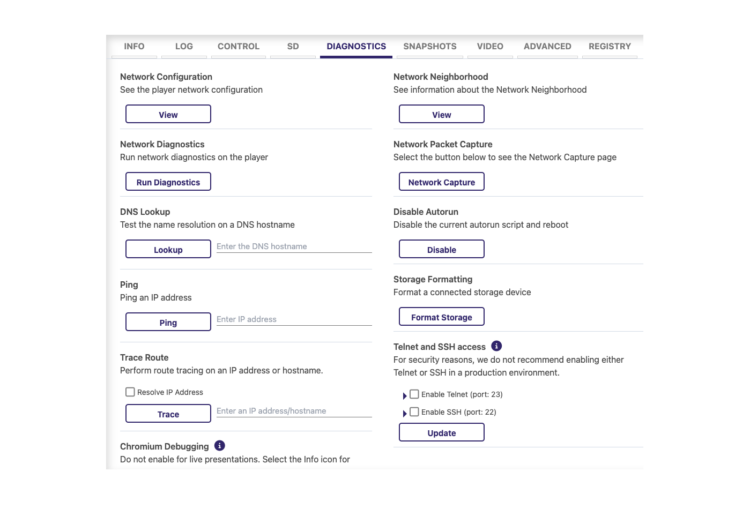
Every BrightSign media player has a built-in Diagnostic Web Service that enables remote control and monitoring of the player from computers directly on the local network. This service can be accessed from your browser using the IP address of the player. It allows you to configure and manage the player and view the player’s status and logs.
BrightSign control supports all of those capabilities — from anywhere you have internet access. You can login to https://bsn.cloud/ and conveniently and securely reach your players. This allows you to make your player more secure by disabling local network access and instead managing the player only through BrightSign Control. BrightSign highly recommends that all players be controlled through the BrightSign cloud console. If players are operated locally, you should change the players’ passwords from the default to prevent unauthorized access.
Simplified Player Registration
Players can be registered on BrightSign Control in a variety of ways. You can register a player in the BrightSign Control cloud console, or in BrightSign Author, by entering the serial number of the player. You can also register your player at the time of installation by scanning a QR code that’s displayed on the screen. Once registered, the player will appear in your BrightSign Control account and can be managed remotely.
BrightSign Control Integrations
All BrightSign software exposes software Application Programming Interfaces (APIs) to enable integration into other systems. BrightSign Control provides all functionality directly through APIs as well as through the cloud console. Should your business need custom control to leverage our software, it can easily be built. Contact us for more information.
Conclusion
BrightSign offers a free web service to manage control and remote configuration of your players. From your computer, you can see all of your players at-a-glance, drilling down into each to inspect its status and configure (or reconfigure) it as needed. With automated provisioning, you can simplify the setup of players on deployment and provide an easy way to recover a mis-configured player. All of this is provided through a modern, secure web service that you can customize as needed through BrightSign APIs. And, registering your players in BrightSign Control automatically activates their 5-year warranty.
In addition to BrightSign Control, BrightSign offers a suite of software services to help you operate your BrightSign players. BrightSign Author is a free, intuitive application that provides a low-code/no-code authoring environment for rich media applications — including interactivity. It also supports all features of BrightSign Control. Users of BrightSign Author can also choose to use our BrightSign Author Plus cloud service. This paid service combines powerful content creation with advanced network and account controls, content scheduling, and management, enabling teams to collaborate efficiently and scale confidently across complex digital signage networks.
For more information or for a demo of BrightSign Control, please contact your BrightSign sales representative or reseller. Or visit https://bsn.cloud/ to sign up for free!